Confinity Documentation
  • Latest Version
  • Latest Version
  • Getting Started

    • Introduction
    • Core Concepts
    • Create an Application
    • Glossary
  • Essentials

    • Authentication & SSO
    • Breaking Changes
    • Roslyn Source Analyzers
    • Changelog
    • ConfinityContent
    • ConfinitySelectable
    • Confinity Schedules
    • Data Seeding
    • Development guidelines [WIP]
    • Entity App
    • Entity Form
    • Entity Permissions
    • Frontend Configuration
    • Images
    • Known Issues
    • Localization
    • Migrations
    • Modules [WIP]
    • On-Site Editing
    • Settings
    • Cascade Delete
    • Replication
    • Infrastructure
  • Modules

    • Analytics Module
    • Assets Module
    • Blog Module
    • Cookie Consent Module
    • Forms Module
    • Friendly Captcha (Forms Module )
    • GeoIP Module
    • Htmx
    • Mail Module
    • Mailing Module
    • MediaPlayer Module
    • GoogleMyBusiness Module
    • OpenTelemetry Module
    • Pages Module [WIP]
    • Pattern Library Module
    • SIX Saferpay (worldline) Module
    • Products Module
    • Search Module
    • Wizard Module
  • Guides

    • Create a Custom Entity App Form Element
    • Date and Time
    • Entity Change Listener
    • File Upload / Temp File
    • HTTP security headers
    • conventions [WIP]
    • How to use Confinity with nginx
    • Notifications
    • Nullability
    • Rename Entity
    • Schedules
    • Useful snippets
    • Content Localization
  • Design Guidelines

    • Introduction
    • Page Components
    • Forms Module

Entity Form

An Entity Form is a structured form in the Admin Panel for authors to edit entities and ConfinityContent.

Configure an Entity Form

An Entity Form is defined by using Confinitys FormBuilder API while configuring an Entity App or by registering a ConfinityContent.

Example: Defining a form by configuring an Entity App

Todo

Example of registering an Entity App

Example: Defining a form by registering a ConfinityContent

Todo

Example of registering a ConfinityContent

Form Elements

There are a lot of different form elements you can choose from for your form.

Tabs

Every form starts with a tab. In a simple form you will probably have only one tab. In this case, the Tab isn't actually visible to the user.

Todo

Todo

Input Field

Method: AddInput

The input field is a single or multiline text field and can be used for primitive data types like string, int, float, double, etc.
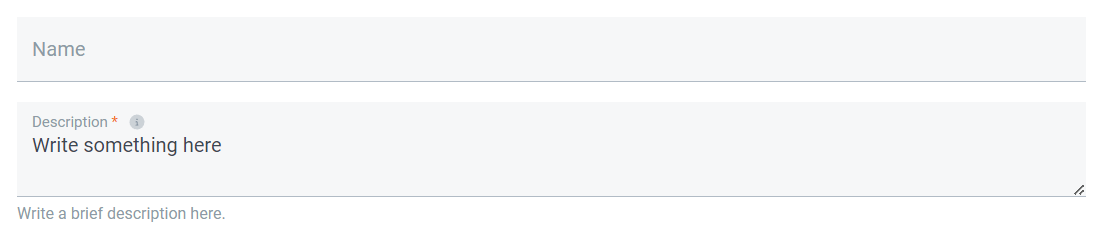
Input field

More information

Prev
Entity App
Next
Entity Permissions