Entity App
The Entity App is a key feature of Confinity. It offers a way to edit entities by an author and store changes in the database in a simple manner. You must create your own module to access the configuration.
Configure a Entity App
To create a entity app, you have to register it in your module.
public void AddModule(IModuleContext module)
{
    var companyApp = module.Configure.AddEntityApp("company", "Company", Icon.PeopleCarryBox);
}
This creates a new menu entry under apps with your configured name and icon. 
You get back a builder where you can customize the entry in the menu or add content to the entity app.
Entity App Content
Different content can be added to the entity app. Currently supported are:
- Entities with:
- Tables
- Trees
- Tabs
companyApp.AddEntity<Employee>(viewBuilder =>
{
    // Content goes here
});
Entity Tables & Trees
viewBuilder
    .AddTable(table =>
    {
        table.Label("Employee Table");
        table.Display(employee => employee.FirstName);
        table.Display(employee => employee.LastName);
        table.Display(employee =>
            employee.Manager != null
                ? employee.Manager.FirstName + " " + employee.Manager.LastName
                : "", "Manager");
        table.AddDefaultActions(form => form.AddTab(tab =>
        {
            tab.AddInput(employee => employee.FirstName).Label("First Name");
            tab.AddInput(employee => employee.LastName).Label("Last Name");
            tab.AddSelectSingle(employee => employee.Manager!,
                employee => employee.FirstName + " " + employee.LastName);
        }));
    });
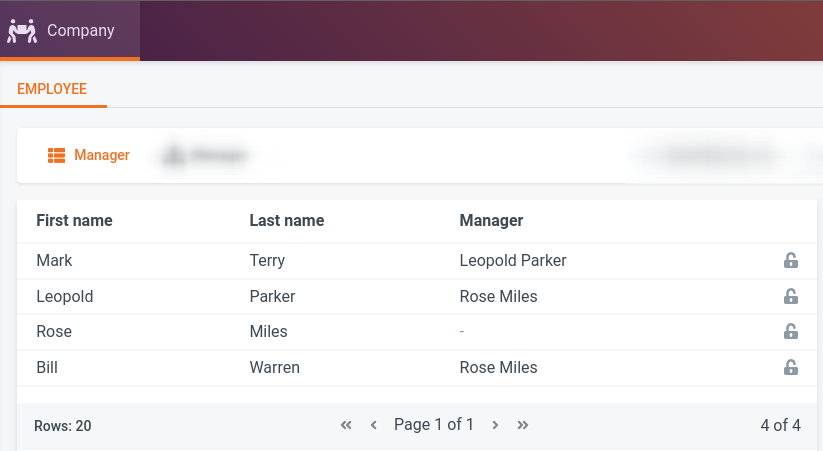
viewBuilder
    .AddTree(tree =>
    {
        tree.Label("Employee Hierarchy");
        tree.Display(employee => employee.FirstName);
        tree.Display(employee => employee.LastName);
        tree.Display(employee =>
            employee.Manager != null
                ? employee.Manager.FirstName + " " + employee.Manager.LastName
                : "", "Manager");
    }, employee => employee.Manager!, (employee, parent) =>
        (parent == null && employee.Manager == null) ||
        (employee.Manager != null && employee.Manager.Id == parent));
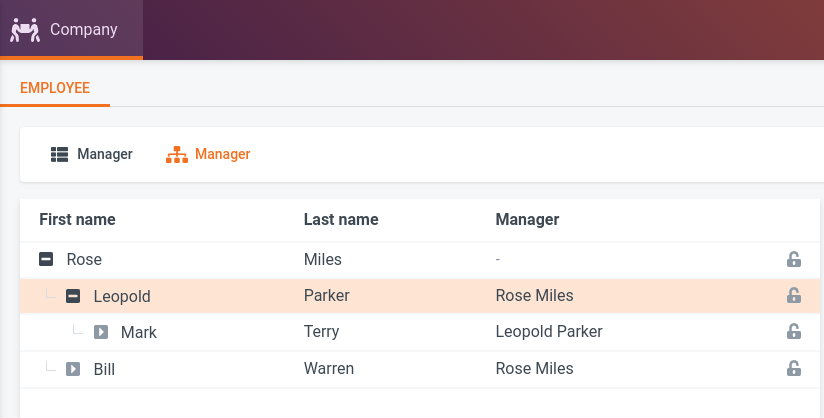
In order to add / edit / delete / publish entities, you can add default actions on your Table- / TreeLayoutBuilder.
table.AddDefaultActions(form => form.AddTab(tab =>
{
    tab.AddInput(employee => employee.FirstName).Label("First Name");
    tab.AddInput(employee => employee.LastName).Label("Last Name");
    tab.AddSelectSingle(employee => employee.Manager!,
        employee => employee.FirstName + " " + employee.LastName);

    tab.AddInput(employee => employee.Email);
    tab.AddInput(employee => employee.Phone)
        .Pattern("\\+\\d{1,3} \\d{2} \\d{3} \\d{2} \\d{2}")
        .Validate(v => v.Regex(PhoneNumber(),"Must match pattern +## ## ### ## ##"));
    tab.AddInput(employee => employee.JobTitle)
        .Label("Title")
        .Validate(v => v.NotEmpty());
    tab.AddSelectAsset(employee => employee.Photo)
        .FileTypeFilter(new RasterImageDescriptor())
        .Label("Portrait Photo");
}));
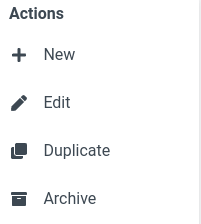
This will add these actions on the right.
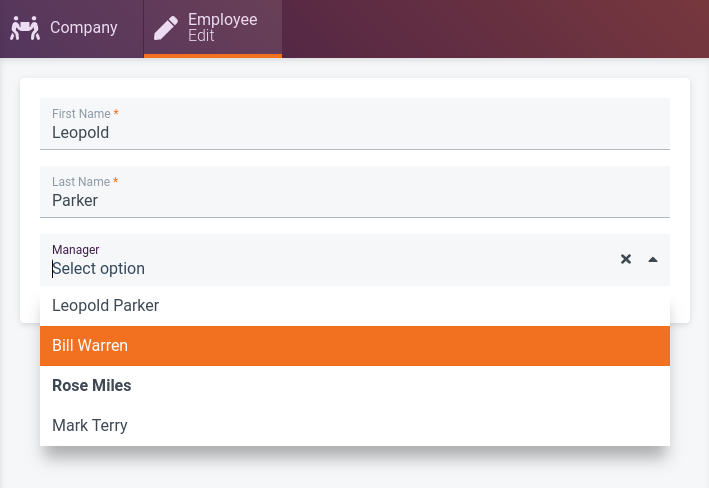
With the given configuration the Employee can now be modified.
Tabs
If you don't want to work with entities but offer a bunch of actions, use the Tab method.
Form Elements
When using the Entity App, the following elements are available for designing a New or Edit form.
Input
Input for text, numbers, dates and time. Offers special functionality like a calendar picker and a wide range of validations.
Switch
Simple true or false switch.
Html Editor
WYSIWYG editor for formatted text.
Select single
Select a single element out of a set of elements, displayed either as a list or a tree. Elements can be entities, ConfinitySelectables or predefined primitives (text, numbers, enum...).
Select multiple
 Select multiple elements out of a set of elements. Elements can be entities, ConfinitySelectables, or predefined primitives (text, numbers, enum...). Check the following examples for implementation details.
Select multiple entities on an entity
In this example, we are going to define a form for the entity Team (referred to as entity) where authors can select Players (referred to as selectable).
many-to-many entities
The many-to-many entity must inherit ManyToManyBase and implement foreign keys (e.g. TeamId and PlayerId) explicitly.
public class Team : ConfinityEntity
{
    public string? Name { get; set; }
    public ICollection<TeamMembership>? Memberships { get; set; }
}

public class Player : ConfinityEntity
{
    public string? FirstName { get; set; }
    public string? LastName { get; set; }
}

public class TeamMembership : ManyToManyBase
{
    public Guid TeamId { get; set; }
    public Team Team { get; set; } = null!;
    public Guid PlayerId { get; set; }
    public Player Player { get; set; } = null!;
}
The form configuration uses a overload of AddSelectMultiple with 3 parameters.
- A selector for the property that represents the many-to-many entity
- A selector for the selectable entity property on the many-to-many entity
- A function that returns the label shown on the UI for each selectable (this must be translatable to SQL).
private void TeamForm(IFormLayoutBuilder<Team> builder)
{
    builder.AddTab(tab =>
    {
        tab.AddSelectMultiple(team => team.Memberships, member => member.Player,
            player => "Player: " + player.FirstName!);
    });
}
Select multiple entities on a ConfinityContent
For details, what a ConfinityContent is, see ConfinityContent
In this example, we are going to define a form for the ConfinityContent BlogTeaser where authors can select BlogArticles (referred to as selectable).
public sealed class BlogTeaser : ConfinityContent
{
    public string? Introduction { get; set; }
    public ICollection<EntityRef<BlogArticle>> BlogArticles { get; set; } = [];
}

public class BlogArticle : ConfinityEntity
{
    public string Title { get; set; } = null!;
    public string? Content { get; set; }
}
The form configuration uses an overload of AddSelectMultiple with two parameters.
- A selector for the property that represents the entity
- A function that returns the label shown on the UI for each selectable (this must be translatable to SQL).
private void BlogTeaserForm(IFormLayoutBuilder<BlogTeaser> builder)
{
    builder.AddTab(tab =>
    {
        tab.AddSelectMultiple<BlogTeaser, BlogArticle>(teaser => teaser.BlogArticles,
            article => article.Title.ToUpper());
    });
}
Contrary to the previous example, the generic parameter types must be stated explicitly.
- The
ConfinityContenttype that owns the collection. - The selectable entity type.
Select multiple entities on a ConfinityContent with a custom provider
As in the previous example, we are going to define a form for the ConfinityContent BlogTeaser where authors can select BlogArticles (referred to as selectable). To further customize the selectable entities, a ISelectOptionsProvider is implemented. It can use DI services.
The form configuration uses an overload of AddSelectMultiple with a single parameter, the selector for the property that holds the selectable entities. Additionally, two generic parameters must be stated explicitly:
- The entity type that can be selected, wrapped in a
EntityRef<>. - The type implemeing
ISelectOptionsProvider<>.
private void BlogTeaserForm(IFormLayoutBuilder<BlogTeaser> builder)
{
    builder.AddTab(tab =>
    {
        tab.AddSelectMultiple<EntityRef<BlogArticle>, ArticleProvider>(p => p.BlogArticles);
    });
}

public class ArticleProvider(IConfinityDbContext dbContext) : ISelectOptionsProvider<EntityRef<BlogArticle>>
{
    public async Task<IReadOnlyCollection<ISelectOption<EntityRef<BlogArticle>>>> GetOptions(
        GetOptionsParameters getOptionsParameters)
    {
        var articles = await dbContext.Set<BlogArticle>().ToListAsync();
        return articles.Select(Transform).ToList();
    }

    private static SelectOption<EntityRef<BlogArticle>> Transform(BlogArticle article)
    {
        //because we are providing ISelectOptions for a ConfinityContent, the first parameter must be an EntityRef
        return new SelectOption<EntityRef<BlogArticle>>(new EntityRef<BlogArticle>(article.Id), article.Title);
    }
}
Select multiple constants
In this example, we are going to define a form for the ConfinityContent FibonacciModel where authors can select predefined fibonacci numbers.
public sealed class FibonacciModel : ConfinityContent
{
    public ICollection<int> SelectedNumbers { get; set; } = [];
}
The form configuration uses a overload of AddSelectMultiple with a single parameter: A selector for the property that holds the constant values. In addition, the options must to be defined, either just as values or as ISelectOption<T> objects with values and labels.
private void FibonacciForm(IFormLayoutBuilder<FibonacciModel> builder)
{
    builder.AddTab(tab =>
    {
        tab.AddSelectMultiple(p => p.SelectedNumbers!)
            .Options(1, 2, 3, 5, 8)
            .Options(new SelectOption<int>(1, "one"),
                new SelectOption<int>(2, "two"),
                new SelectOption<int>(3, "three"),
                new SelectOption<int>(5, "five"),
                new SelectOption<int>(8, "eight"));
    });
}
Select options from a provider
In this example, we are going to define a form for the ConfinityContent ExternalPersonsModel where authors can select persons provided by a ISelectOptionsProvider.
public sealed class ExternalPersonsModel : ConfinityContent
{
    public ICollection<Guid> SelectedPersons { get; set; } = [];
}
The ISelectOptionsProvider can use dependency injection and call third-party systems (if needed).
public class Provider : ISelectOptionsProvider<Guid>
{
    public Task<IReadOnlyCollection<ISelectOption<Guid>>> GetOptions(GetOptionsParameters getOptionsParameters)
    {
        return Task.FromResult<IReadOnlyCollection<ISelectOption<Guid>>>(
            [
                new SelectOption<Guid>(Guid.NewGuid(), "Marie Curie"),
                new SelectOption<Guid>(Guid.NewGuid(), "Grace Hopper")
            ]
        );
    }
}
The form configuration uses an overload of AddSelectMultiple with a single parameter: A selector for the property that holds the constant values. Additionally, the two generic parameters must be defined:
- The selectable type
- The select options provider type
private void ExternalPersonsForm(IFormLayoutBuilder<ExternalPersonsModel> builder)
{
    builder.AddTab(tab =>
    {
        tab.AddSelectMultiple<Guid, Provider>(p => p.SelectedPersons!);
    });
}
Select multiple ConfinitySelectables
See Confinity Selectables example.
Child list
Manage child Entities in a Table with create, update & delete actions.
Computed
Display a computed value, either from a simple lambda or by implementing IComputedHandler<TEntity, TProperty>.
Computed by lambda
Use this for displaying simple transformations of the existing information in the form. Take note that all properties, which are not already part of the form, must be invoked inside a call to DependentProperty.
private void PlayerForm(IFormLayoutBuilder<Player> builder)
{
    builder.AddTab(tab =>
    {
        tab.AddComputed(p => $"{p.FirstName} {p.LastName}", "Full name")
            .DependentProperty(p => p.FirstName)
            .DependentProperty(p => p.LastName);
    });
}
Computed by IComputedHandler
By implementing a IComputedHandler<TEntity, TProperty> you can define a custom logic and have access to DI.
private void PlayerForm(IFormLayoutBuilder<Player> builder)
{
    builder.AddTab(tab =>
    {
        tab.AddComputed<PlayerComputedHandler>("Team");
    });
}

// ReSharper disable once ClassNeverInstantiated.Global
internal class PlayerComputedHandler(IConfinityDbContext dbContext) : IComputedHandler<Player, string>
{
    public async Task<string> Invoke(Player entity)
    {
        var teams = await dbContext.Set<TeamMembership>()
            .Where(p => p.PlayerId == entity.Id)
            .Select(m => m.Team.Name)
            .ToListAsync();

        return string.Join(", ", teams);
    }
}
Warning
The compute handler is executed every time the validation is triggered (after each input). Therefore, the implementation should be as fast as possible. The entity can be modified. Do not delete inputs from the user for a better user experience.
Custom form element
Haven't found an element that meets your requirements? You can even build and use your own custom form element. Read more in the Create a Custom Entity App Form Element guide.
ConfinitySelectable
For details, what a ConfinitySelectable is, see ConfinitySelectable
Use in a table
To display the ConfinitySelectable simply refer to the property in your table configuration.
private void PersonTableConfig(IEntityAppBuilder app)
{
    app.AddEntity<Person>(e =>
    {
        e.Key("person-entity").Label("People");
        e.AddTable(table =>
        {
            table.Display(p => p.Name);
            table.Display(p => p.ShirtSize);
        });
    });
}
When referring to a ConfinitySelectable, Confinity will automatically transform the persisted ids
to the defined labels.
Use in an entity form
In your form configuration you can use AddSelectSingle with your property, e.g.:
private void PersonFormConfig(IFormLayoutBuilder<Person> form)
{
    form.AddTab(tab =>
    {
        tab.AddInput(p => p.Name);
        tab.AddSelectSingle(p => p.ShirtSize);
    });
}
Confinity will create select options according to the defined constants in your ConfinitySelectable.
Use in a ConfinityContent form
In your form configuration you can use AddSelectSingle and AddSelectMultiple with your properties, e.g.:
private void StoreFrontFormConfig(IFormLayoutBuilder<StoreFront> form)
{
    form.AddTab(tab =>
    {
        tab.AddSelectSingle(p => p.DefaultShirtSize);
        tab.AddSelectMultiple(p => p.AvailableShirtSizes);
    });
}
Obsolete Attribute
Properties which have the ObsoleteAttribute technically work, but are no longer available for selection. It intended use is for non breaking backwards compatible changes.