ConfinityContent
Overview
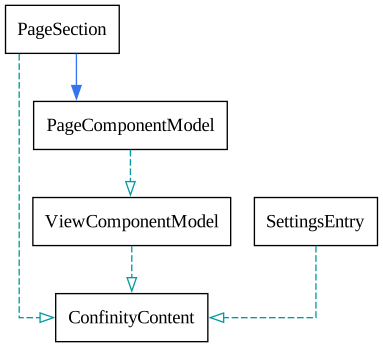
With ConfinityContent Confinity provides a document (NoSql) based approach to store data together with relational ( Sql) entities. This is useful for complex models with small number of instances. Representing those models as tables in a database would result in many tables with only very few (or even zero) records.Confinity.Pages uses this concept heavily for defining the content of a page. Classes inheriting from PageComponentModel define content for a page and will often only be used once in an application (e.g. 'SearchResultPageConfiguration').
Implementation rules & options
ConfinityContent is designed with specific guidelines in mind, tailored exclusively for Confinity. As such, adherence to certain rules is essential.
Warning
Don't change a property's name or type when data was already persisted. This would lead to deserialization errors which must be fixed manually in the database and can cause all sorts of issues.
Rules
- The class must inherit from
ConfinityContent - The class must have a parameterless constructor
- Use the
sealedorabstractkeyword to define whether thisConfinityContentcan be instantiated or just defines a common contract.- In some cases your
ConfinityContentcan be neither sealed nor abstract, then you need to mark it with theConfinityAllowInheritanceAttribute.
- In some cases your
- Use
publicaccessible properties with getters and setters for all data that should be persisted. Supported types:- primitive types, e.g.
int,string,DateTimeOffset - other
ConfinityContents - types inheriting
ConfinityEntitywrapped in aEntityRef<T>, e.g.EntityRef<Asset ICollection<T>of the former
- primitive types, e.g.
- Properties must either be non-nullable or have a default value
Tips
Default values given to properties are used as defaults in the entity app form configuration.
Options
- Override
string ConfinityPreview()to show a summary of configured values to the author - Configure the form for your
ConfinityContentby either implementingIConfinityContentConfigurationor callingRegisterConfinityContentin your module configuration. - Use the
[ConfinityLabel]attribute to set a label for the author
Example
public abstract class MediaContent : ConfinityContent
{
    public string? Title { get; set; }
    public EntityRef<Asset>? Media { get; set; }
}

[ConfinityLabel("Audio")]
public sealed class AudioContent : MediaContent, IConfinityContentConfiguration<AudioContent>
{
    public string? Transcript { get; set; }

    public void Configure(IConfinityContentBuilder<AudioContent> builder)
    {
        builder.Editor(form => form.AddTab(tab =>
        {
            tab.AddInput(p => p.Title);
            tab.AddSelectAsset<AudioContent>(p => p.Media)
                .Validate(p => p.NotNull())
                .FileTypeFilter(new WebAudioDescriptor());
            tab.AddInput(p => p.Transcript);
        }));
    }

    public override string ConfinityPreview()
    {
        if (string.IsNullOrWhiteSpace(Transcript))
            return "";

        return Transcript.Length > 50 ? Transcript[..50] : Transcript;
    }
}

[ConfinityLabel("Video")]
public sealed class VideoContent : MediaContent, IConfinityContentConfiguration<VideoContent>
{
    public EntityRef<Asset>? PreviewImage { get; set; }

    public void Configure(IConfinityContentBuilder<VideoContent> builder)
    {
        builder.Editor(form => form.AddTab(tab =>
        {
            tab.AddInput(p => p.Title);
            tab.AddSelectAsset<VideoContent>(p => p.Media)
                .Validate(p => p.NotNull())
                .FileTypeFilter(new WebVideoDescriptor());
            tab.AddSelectAsset<VideoContent>(p => p.PreviewImage)
                .Validate(p => p.NotNull())
                .FileTypeFilter(new WebImageDescriptor());
        }));
    }
}