Confinity Documentation
  • Latest Version
  • Latest Version
  • Getting Started

    • Introduction
    • Core Concepts
    • Create an Application
    • Glossary
  • Essentials

    • Authentication & SSO
    • Breaking Changes
    • Roslyn Source Analyzers
    • Changelog
    • ConfinityContent
    • ConfinitySelectable
    • Confinity Schedules
    • Data Seeding
    • Development guidelines [WIP]
    • Entity App
    • Entity Form
    • Entity Permissions
    • Frontend Configuration
    • Images
    • Known Issues
    • Localization
    • Migrations
    • Modules [WIP]
    • On-Site Editing
    • Settings
    • Cascade Delete
    • Replication
    • Infrastructure
  • Modules

    • Analytics Module
    • Assets Module
    • Blog Module
    • Cookie Consent Module
    • Forms Module
    • Friendly Captcha (Forms Module )
    • GeoIP Module
    • Htmx
    • Mail Module
    • Mailing Module
    • MediaPlayer Module
    • GoogleMyBusiness Module
    • OpenTelemetry Module
    • Pages Module [WIP]
    • Pattern Library Module
    • SIX Saferpay (worldline) Module
    • Products Module
    • Search Module
    • Wizard Module
  • Guides

    • Create a Custom Entity App Form Element
    • Date and Time
    • Entity Change Listener
    • File Upload / Temp File
    • HTTP security headers
    • conventions [WIP]
    • How to use Confinity with nginx
    • Notifications
    • Nullability
    • Rename Entity
    • Schedules
    • Useful snippets
    • Content Localization
  • Design Guidelines

    • Introduction
    • Page Components
    • Forms Module

Input Field

The input field is a single or multiline text field and can be used for primitive data types.

Supported Data Types

  • string
  • short
  • int
  • float
  • double

Examples

The following example code creates a simple input field for the property Name.


tab.AddInput(p => p.Name);

You can also create a multiline text field and add a custom label, default value, comment and more like the following example.
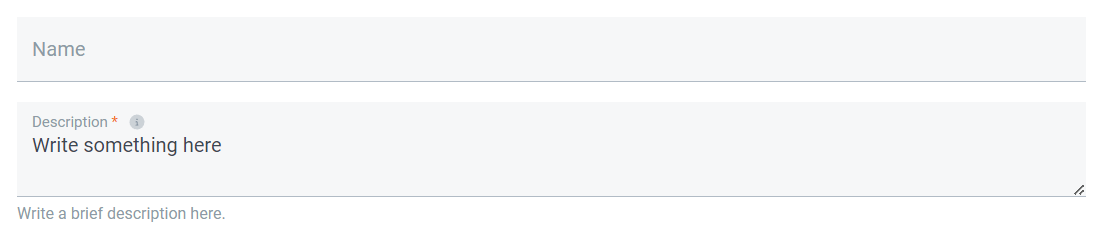
Input field

Configuration:


tab.AddInput(p => p.Description)
    .Label("Description")
    .Default("Write something here")
    .MultipleLines("200px")
    .Comment("Write a brief description here.")
    .Tooltip("Here's more information about this form field.")
    .Validate(v => v.NotNull());

A more complex input field with suffix, prefix, max length and email address validation can be configured like the following code example.

Input field

Configuration:


tab.AddInput(p => p.EmailAddress)
    .Label("Your email address")
    .Default("default@example.com")
    .Prefix("Prefix")
    .Suffix("Suffix")
    .MaxLength(100)
    .Comment("Please enter your email address.")
    .Tooltip("Here's more information about this form field.")
    .Validate(v => v.NotNull().Email());